Spurbets Kenya guide
Spurbets Login
When I opened the Spurbets login form for the first time, I counted only two fields and one green button. Spurbets does not use email, usernames or social logins. Your phone number is your login. Once you know where each element sits, you can get into your account in seconds. Here is how the Spurbets login works on the website and in the Android app.
- Licence
- BCLB BK0000687
- Free stake
- KSh 20
- Deposit from
- KES 100
- Support
- 24/7
01Login Button Location
The Spurbets Login button sits in the top right corner of every page. It shares a dark rounded frame with the green Register button.

I checked the button on three screens, and it appeared in the same spot each time:
| Screen | Login button position |
|---|---|
| Desktop homepage | Top right, left of Register |
| Mobile homepage | Top right, left of Register |
| Game lobbies and Promotions page | Top right, same frame |
On the desktop, the Login button is white text on a dark background, and Register is filled with green. On a phone, the frame stays in the same place above the banners. You can log in from any section, including the crash games lobby.
02Spurbets Login Form Fields
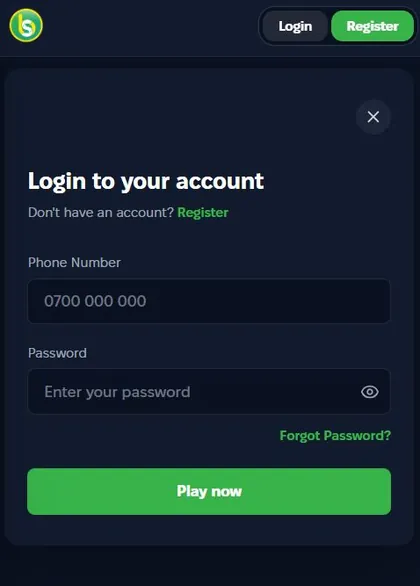
The Spurbets login form has two fields: Phone Number and Password. Under them sits one green Play now button. The window is titled "Login to your account".
Under the title, I saw the line "Don't have an account? Register". The word Register is a green link to the sign-up form. In the top right corner of the window, a round X button closes it.
Phone Number Format 0700 000 000
The Phone Number field shows the placeholder 0700 000 000. Enter the number you registered with in the same format.
- Tap the Phone Number field.
- Type your number starting with 0, for example 0712 345 678.
- Check that there are no extra spaces at the end.
This number is also your M-Pesa wallet on Spurbets. Spurbets sends withdrawals to it. That is why you must use exactly the same number you entered at registration.
Password Field and Visibility Icon
The Password field shows "Enter your password" in grey text. There is an eye icon on its right side. Tap the eye to see the characters you typed.
I find the eye icon most useful on a phone. Phone keyboards often capitalize the first letter or add a space after a word. A quick tap shows the password in plain text, so you can catch these errors before you submit.
| Element | Location | Function |
|---|---|---|
| Password field | Second field in the form | Password entry |
| Eye icon | Right edge of the Password field | Shows or hides the characters |
| Forgot Password | Green link under the field, on the right | Starts the password reset |
Play Now Button for Account Entry
The green Play now button at the bottom of the form logs you in. Press it after you fill in both fields.
When the login succeeds, the form closes. Your account and balance replace the Login and Register buttons in the header. From there, you can open the wallet, the Promotions page or any game. If you just registered, the KSh 20 Welcome Stake is already in your balance.
03Spurbets Login Through the Android App
On Android, you can log in through the Spurbets app. The app uses the same phone number and password as the website. You install it from an APK file on spurbets.com.
An APK (Android Package Kit) is the installation file for Android apps that are not on Google Play. The Spurbets app is not listed on Google Play. You get it only from the official website.
APK Download From the Official Website
You download the Spurbets APK with the Download App button in the menu of spurbets.com. On the desktop site, I found it at the bottom of the left menu. It has a graphic of a hand holding a phone with game icons.
- Open spurbets.com in Chrome on your Android phone.
- Open the side menu and tap Download App.
- Open the downloaded file.
- Allow Chrome to install unknown apps when Android asks.
- Tap Install.
Download the APK only from spurbets.com. A file from a chat group or another site can contain changes that put your account at risk.
Account Entry Inside the App
Inside the app, you log in exactly as on the website. Tap Login, enter your phone number and password, and tap Play now.

- Open the Spurbets icon on your home screen.
- Tap Login in the top right corner.
- Enter your registered phone number.
- Enter your password.
- Tap Play now.
Your balance, bonuses and history are stored on your account, not on the phone. You see the same balance in the app as on the website.
04Password Recovery
If you forget your password, tap the green Forgot Password link under the Password field. The reset runs through your registered phone number.
- Open the login form.
- Tap Forgot Password.
- Enter the phone number linked to your account.
- Follow the instructions on screen to confirm the number.
- Create a new password and log in with it.
Keep your phone nearby during the reset. Your balance and bonuses do not change when you reset the password.
05Login Errors and Their Causes
Most Spurbets login errors have one of three causes: a wrong number or password, a number that is not registered, or a weak mobile connection.
| Error | Most likely cause | First thing to try |
|---|---|---|
| Login rejected | Typo in the number or password | Tap the eye icon and check |
| Account not found | Number not registered on Spurbets | Check the number or tap Register |
| Form does not respond | Weak or expired data bundle | Switch to Wi-Fi or top up data |
Incorrect Phone Number or Password
If Spurbets rejects your details, check the phone number first, then the password. Most rejected logins come from one wrong character.
- Make sure the number starts with 0 and matches the one you registered with.
- Tap the eye icon and check for capital letters and spaces.
- If you still cannot log in, use Forgot Password.
Unregistered Phone Number
If the number you enter has no Spurbets account, the login will not go through. This can happen if you registered with a different SIM card.
Try the other numbers you use. If none of them works, create a new account through the Register link in the form. New accounts get the KSh 20 Welcome Stake.
Unstable Internet Connection on Mobile Data
A weak signal or an empty data bundle can stop the login form from responding after you press Play now.
- Check that your data bundle is active.
- Move to a place with a stronger signal, or connect to Wi-Fi.
- Reload the page or reopen the app.
- Enter your details and press Play now again.
The login form itself uses very little data. Most delays come from the connection, not from Spurbets.
06Spurbets Account Protection Rules
Your Spurbets account holds real money, and it is tied to your M-Pesa number. A few rules keep it safe.
Spurbets support never asks for your password or your M-Pesa PIN. Any message that asks for them is not from Spurbets.
Password Strength and Storage
A strong Spurbets password is long, unique and different from your M-Pesa PIN.
| Do | Avoid |
|---|---|
| Use at least 8 characters | Short codes like 1234 or 0000 |
| Mix letters and digits | Your phone number or birth year |
| Keep it unique to Spurbets | The same password as your email or M-Pesa PIN |
| Store it in a password manager | Writing it on paper next to your phone |
Login From Shared or Public Devices
If you log in on a shared phone or a cyber café computer, log out after you finish playing.
- Do not let the browser save your password.
- Log out of your account before you leave.
- Close the browser window.
- Never share your login details through SMS, WhatsApp or Telegram.
Protect your Safaricom line as well. Whoever controls the number can reset the password and receive your withdrawals.
07Spurbets Support Contacts
Spurbets support is available 24/7 by phone, by email and through Live Support on the website. The team can help with login and password issues at any time of day.
| Channel | Contact |
|---|---|
| Phone | 0720006699 |
| [email protected] | |
| Website | Live Support in the left menu |
When you contact support, give your registered phone number and describe what happens when you press Play now. A screenshot of the error helps the team solve the issue faster.
08FAQ
Can I Log In to Spurbets With an Email Address?
No. The Spurbets login form accepts only a phone number and a password.
Which Phone Number Do I Use to Log In?
Use the number you registered with. It is also your M-Pesa number for deposits and withdrawals.
Is the Login the Same on the App and the Website?
Yes. The Android app, the mobile website and the desktop site use the same login details.
How Do I Reset My Spurbets Password?
Tap Forgot Password under the Password field and enter your registered number. Then follow the steps to set a new password.
Why Does Spurbets Reject My Password?
The usual causes are a typo, an automatic capital letter or an extra space. Check the password with the eye icon, or reset it with Forgot Password.
Can I Use One Spurbets Account on Two Devices?
Yes. You can log in with the same details on your phone and your computer, and you see the same balance on both.